truenas qnap synology

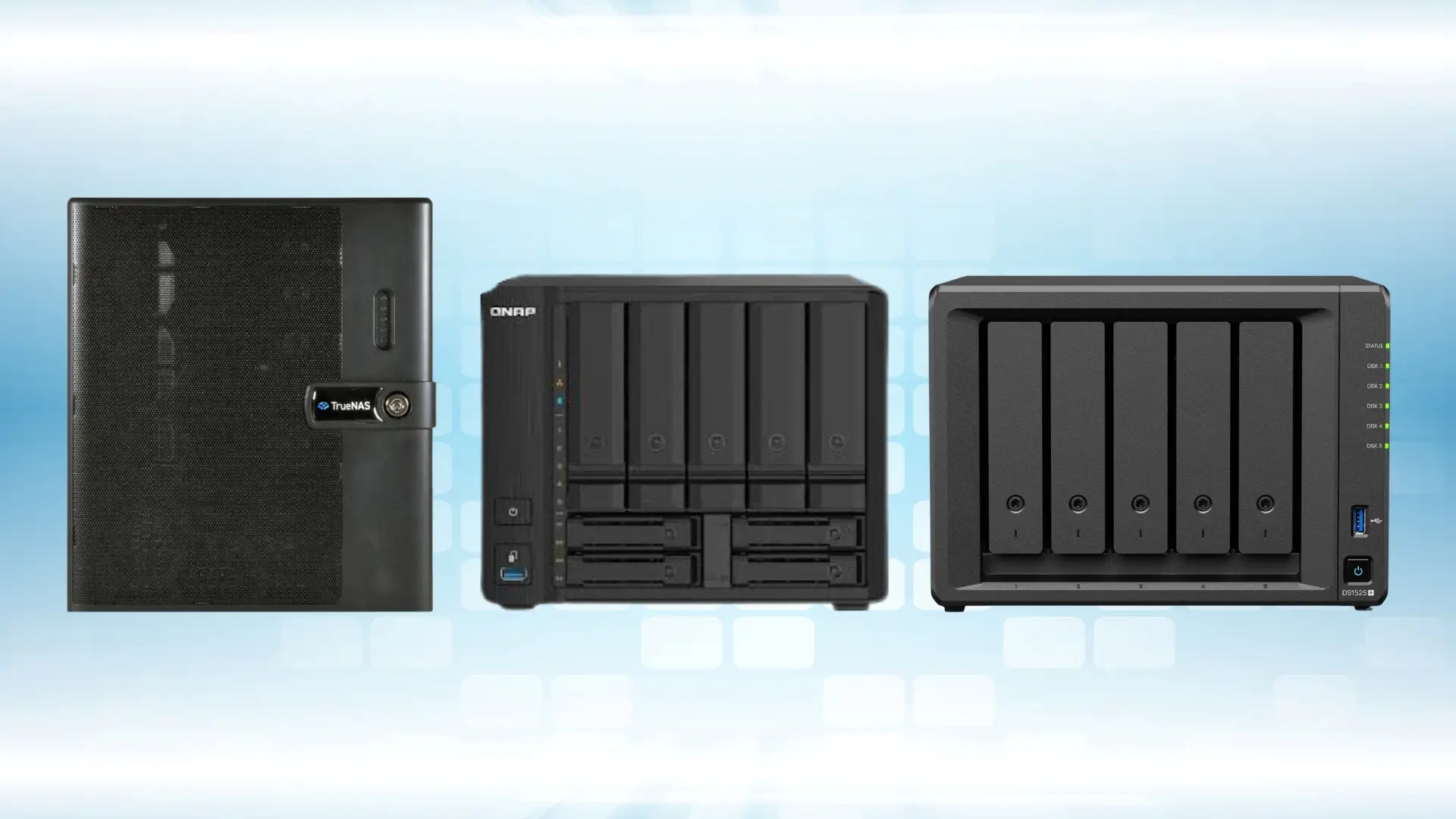
TrueNAS Mini X+ vs QNAP TS-932PX vs Synology DS1525+

16 Mar 2026 ·Blog ·DiGiCOR

Choosing a NAS isn’t just a spec comparison. It’s a decision about how you want to protect data, how you expect performance to behave under load, and how much time your team wants to spend managing storage over the next 3–5 years.

Below is a practical, comprehensive guide to help you decide between TrueNAS Mini X+, QNAP TS-932PX and the closest equivalent Synology model (DS1525+). It’s written for people who actually plan to run this gear in production: shared storage, backups, VM storage, creative teams, and ransomware recovery.v

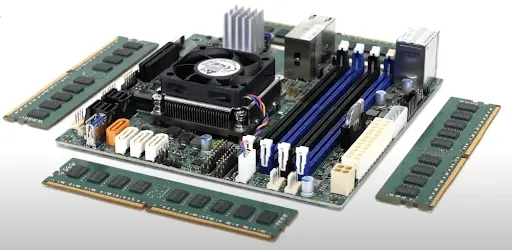
Components of TrueNAS Mini X+

1. The “real” decision: what are you optimising for?

Most NAS purchases go wrong because buyers optimise for the wrong thing. Before looking at bays and ports, decide which of these matters most in your environment:

A) Maximum data integrity and storage transparency
If your NAS is the “source of truth” (finance files, project archives, engineering data, backups you must trust), you’ll care most about predictable storage behaviour, visibility, and robust data protection mechanics.

B) Performance and low-latency tiers for mixed workloads
If you’re running virtual machines, high-IOPS workloads, or you need a fast “hot tier” for active projects, you’ll want hybrid storage options and higher network throughput from day one.

C) Operational simplicity and fast recovery workflows
If your success metric is “how quickly can we restore after user error or ransomware,” and you want a guided admin experience, you’ll prioritise a platform that makes snapshots, backups, and restores simple and repeatable.

Keep that in mind as you read the comparison.

2. Quick comparison table (what changes the real-world outcome)

Table 1: Hardware and platform highlights

Model

Best for

Bays

SSD/NVMe approach

Networking (base)

Upgrade path

TrueNAS Mini X+

Storage-first reliability, ZFS transparency

7 total (5x 3.5" + 2x 2.5")

Typically 4x 1GbE (model dependent)

SATA pools + optional SSD roles (cache/log depending on design)

2x 1/10GbE Ports (RJ-45) (this is the model we have stocked)

N/A (Already at max. memory)

Mixed workloads + built-in high speed + hybrid tiers

9 total (5x 3.5" + 4x 2.5")

SATA SSDs supported in 3.5” bays, as well as additional 4x 2.5” bays

2x 2.5GbE (RJ-45) +

2x 10Gb (SFP+ Transceivers not included)

Memory upgrade – max 16GB memory

Up to 1x TL-D800C Expansion unit or

Up to 2x TR-004 Expansion units

Synology DS1525+

Simplified operations + backup/snapshot workflows

5 SATA bays

Dual M.2 NVMe for cache (keeps front bays free)

2x 2.5GbE (RJ-45)

Optional 1x 10GbE

Memory upgrade (max 32GB memory)

Up to 2x DX525 Expansion Units

Network add-on module for 1x10GbE

Why this matters:

  • If you need 1Gb today with out of the box capability to do 10GbE tomorrow over RJ-45, TrueNAS Mini X+ wins.
  • If you need 10Gb with SFP+ interfaces, QNAP fulfils this with the capability to add additional drive bays
  • If you want simple day-to-day admin and recovery workflows, Synology is often the easiest to operate.
If you want storage behaviour to be explicit and ZFS-led, TrueNAS is built around that philosophy.

3. File system and data protection: the part most people ignore (and regret later)

This is where these platforms fundamentally diverge.

TrueNAS Mini X+ (OpenZFS approach) TrueNAS is storage-first. The platform is built around ZFS and is typically chosen when data integrity and predictable storage behaviour are the priority. In practical terms, this means:

  • A strong focus on pool design, redundancy choices, snapshots, and replication
  • A “storage appliance mindset”: you build it right, then it quietly does its job for years
  • Best when you have (or want) admins who are comfortable with storage concepts and prefer transparency over wizards

QNAP TS‑h932PX (Traditional RAID concept using EXT4 file system on top):

  • Support for RAID level migration and RAID Expansion
  • Volume and LUN snapshot capability
  • SSD cache support

Synology DS1525+ (Btrfs + DSM workflows) Synology takes a “recovery-first operations” approach:

  • Btrfs gives snapshot-based restore workflows and integrity features designed for practical recovery
  • DSM is built around ease-of-use, app workflows, and straightforward administration
  • If your goal is “make restores fast and simple for the business,” Synology’s approach is often compelling

Bottom line:

  • If you want maximum control and storage transparency: look toward platforms like TrueNAS, which are often chosen for their open‑source flexibility and visibility into data management.
  • If you want fast networking out of the box and traditional RAID with expansion capability: solutions such as QNAP are frequently highlighted for delivering strong performance and scalability.
  • If you want the smoothest operational workflows for backup and recovery: Synology is often cited as one example, but QNAP and other solutions can deliver similar ease of use depending on your environment.

4. Workload-based recommendations (real scenarios)

Scenario A: “We need a rock-solid file server + backups + ransomware recovery” Best fits: Synology DS1525+ or TrueNAS Mini X+

Choose Synology DS1525+ when:

  • You want fast, guided snapshot and restore workflows
  • You prefer a highly polished admin experience
  • You’re fine with adding 10GbE later if/when you actually need it

Choose TrueNAS Mini X+ when:

  • Storage is mission critical and you want a storage-first design
  • You want to architect pools and redundancy with a ZFS-led approach
  • You value transparency and predictable behaviour over a purely wizard-driven experience

Scenario B: “We’re running virtual machines, containers, and low-latency workloads” Best fit: QNAP TS‑h932PX

Why:

  • Built-in 10GbE/2.5GbE reduces bottlenecks immediately
  • Hybrid bays make it easier to design a fast tier for active workloads
  • Ideal when you’re balancing capacity (HDD) with performance (SSD)

Scenario C: “Creative team storage: large files, multiple editors, fast access” Best fit depends on your network timeline:

If you need 10GbE now:

  • QNAP TS‑h932PX is often the simplest path because it’s already there (SFP+ Ports)
  • TrueNAS Mini X+ also has 2x 1/10GbE RJ-45 ports out of the box.

If you can start with 1GbE and upgrade later:

  • Synology DS1521+ can be very attractive for teams that want simple management and clean recovery workflows, then add 10GbE as the workflow grows

Scenario D: “We want storage done right, and we have an IT team that cares about architecture” Best fit: TrueNAS Mini X+

Why:

  • If your team thinks in terms of pool layout, redundancy policy, snapshot schedules, and replication design, TrueNAS aligns strongly with that mindset

5. What to ask yourself before buying (a checklist that saves money)

Use this quick checklist before you choose a model:

  1. Do you need 10GbE now, or later?
  • Now (SFP+) → QNAP is usually the fastest route
  • Now (RJ-45) → TrueNAS Mini X+ is the choice
  • Later → Synology with Network module upgrade can be a clean approach, but only supports a single 10Gb Ethernet port
  1. Is NVMe just “cache,” or do you want a true fast tier for workloads?
  • Cache is enough → Synology’s M.2 cache approach can work well
  1. Is your #1 priority “storage transparency and control” or “admin simplicity”?
  • Control/transparency → TrueNAS
  • Simplicity/workflows → Synology
  • Mixed workloads + performance → QNAP
  1. How will you grow?
  • More bays? More users? More throughput? More recovery points? Planning the next 18–36 months helps you avoid buying twice.

Where TrueNAS Mini really wins

Navigating through the elements of the carousel is possible using the tab key. You can skip the carousel or go straight to carousel navigation using the skip links.
In Stock TrueNAS Mini X+
TrueNAS
Show specifications chevron-down
  • Compact Tower
  • Single
  • Intel Embedded Processor
  • DDR4
  • 7
  • 2
  • 10Gb/s
  • 250

From
A$4,124.61 RRP Ex GST

For organisations that treat storage as critical infrastructure, TrueNAS Mini stands out because it is designed as a storage appliance first, not a general‑purpose NAS trying to do everything at once.

One of the biggest advantages of TrueNAS Mini is predictability. Storage behaviour is explicit and consistent—pool layout, redundancy, snapshots, and replication behave exactly as designed, even under sustained load. In real environments, this matters because “it usually works” is not good enough. Silent data issues, edge‑case failures, or unexpected behaviour are simply unacceptable when the NAS holds primary business data or trusted backups.

TrueNAS Mini is also built around a long‑term stability mindset. The platform prioritises conservative defaults, mature storage mechanics, and controlled change over rapid feature churn. For organisations that expect their NAS to run quietly for years with minimal surprises, this stability translates directly into lower operational risk.

Another key differentiator is storage transparency. With TrueNAS, what the system is doing and why is visible and understandable. This is especially valuable for IT teams who want confidence in how data is written, protected, and recovered, rather than relying on opaque automation or black‑box optimisation.

TrueNAS Mini also excels when data integrity matters more than peak benchmarks. The design focuses on correctness, consistency, and recovery instead of chasing short‑term performance gains that may introduce complexity or hidden risk. For backups, file services, archives, and primary business data, this approach significantly reduces long‑term operational stress.

From an operational perspective, TrueNAS Mini encourages doing storage right from day one. Pool design, redundancy decisions, and snapshot strategies are intentional, not afterthoughts. This avoids the common scenario where a NAS needs to be rebuilt later because early shortcuts no longer scale.

Finally, TrueNAS Mini fits naturally into environments that may grow into larger or more advanced storage architectures. The skills, concepts, and data management practices used on a Mini translate cleanly to larger TrueNAS systems, making it a strong foundation rather than a dead‑end platform.

Beyond its local reliability, TrueNAS Mini also benefits from the broader TrueNAS ecosystem. With TrueNAS Connect, organisations gain a single web‑based interface to monitor and manage multiple TrueNAS systems. This unified view reduces administrative overhead, simplifies scaling, and ensures that the same principles of transparency and stability extend across environments — whether you’re running one Mini or a fleet of larger appliances.

 

In short: if you want storage that behaves like infrastructure, TrueNAS Mini delivers control, consistency, and confidence that many teams only realise they need after something goes wrong elsewhere.

Where QNAP TS‑h932PX really wins

QNAP takes a different, but equally valid approach. The TS‑h932PX is designed for organisations that need performance, flexibility, and versatility in a compact form factor.

One of QNAP’s biggest strengths is out‑of‑the‑box performance readiness. With built‑in high‑speed networking and a hybrid bay design, the TS‑h932PX is well suited to environments where throughput matters immediately, such as virtualisation, creative workloads, analytics, or active project storage.

QNAP also shines when you need multiple storage tiers in a single system. The ability to combine high‑capacity HDDs with SSDs makes it easier to create fast tiers for active data while keeping cost‑effective capacity for the rest. This flexibility is especially attractive for mixed workloads that don’t fit neatly into a single storage pattern.

Another advantage is platform versatility. QNAP systems are often used not just as file servers, but as multi‑role platforms: running virtual machines, containers, backup applications, and collaboration tools alongside storage. For teams that want one box to handle multiple jobs, this can simplify infrastructure.

QNAP’s management experience is also geared toward feature accessibility. Advanced capabilities are exposed through a GUI‑driven workflow, making it easier for teams to adopt new features without deep storage expertise. This can speed up deployment and experimentation, especially in fast‑moving environments.

In addition, QNAP offers strong storage expansion capability. The TS‑h932PX supports external expansion enclosures, allowing organisations to scale capacity as data demands grow without replacing the core system. This makes it easier to start small and expand incrementally, aligning investment with actual workload growth.

In short: if your priority is performance density, hybrid storage flexibility, multi‑workload capability, and scalable expansion, QNAP TS‑h932PX is a strong option, particularly when you want high‑speed networking and tiered storage without external add‑ons.

Why DiGiCOR

If you’re still weighing these options, the fastest way to make the right choice is to map your real workloads to the right platform and configuration. That’s exactly what we do.

  • We are a TrueNAS partner and we carry stock in Australia, so you can move quickly without waiting weeks for international lead times.
  • We are also a QNAP partner. If the exact QNAP model you need isn’t currently listed on our website, we can still help source it and deliver the right solution for your timeline and budget.
  • We’re vendor-agnostic. We won’t force-fit a brand. We’ll recommend the platform that best matches your workload, growth plans, and support expectations—even when the answer isn’t the most expensive option.

What you get when you engage DiGiCOR:

  • A clear recommendation: TrueNAS vs QNAP vs Synology based on your real use case
  • Right-sizing guidance: bays, drives, SSD/NVMe strategy, memory, and network
  • A practical deployment approach: performance expectations, snapshot strategy, and recovery planning
  • Sourcing help across vendors (even if a specific model isn’t visible on our website today)

If you’re researching NAS options, you’re already doing the hard part. Let us help you turn research into a configuration you can trust—then supply it, deploy it, and support it.

Contact DiGiCOR to discuss your requirements and we’ll propose the best-fit option (not just a product), along with availability and lead time.

It might interest you...